携帯電話 から ソ ニー テレビ への ワイ ヤ レス 画面 ミ ラー リング には 様々な 方法 があります が 、 一般的な 手順 は 次の とおり です 。’内 蔵 の 画面 ミ ラー リング 機能 同じ ネットワーク を確保 する : 携帯電話 と ソ ニー テレビ を 同じ Wi – Fi ネットワーク に接続 します 。ソ ニー テレビ の 画面 ミ ラー リング 機能を オン に します : キ ーを 押 します“出 典”あるいは“Enter”ソ ニー テレビ の リ モ コン の ボ タン 、 次に 選択 します“ス ク リーン ミ ラー リング”あるいは“投 影”オ プション ( 具体 名称 は テレビ モデル によって 異なる 場合があります ) 。この 時点で 、 ソ ニー TV は 表示 します 。‘外 部 デバイス 接続 を 待 機 中’.携帯電話 の 画面 ミ ラー リング 機能 を開 きます :“ス ク リーン ミ ラー リング”あるいは“ス ク リーン ミ ラー リング”電話 の 機能’設定 または ショ ート カット メ ニュー 。検索 して 接続 する ソ ニー テレビ モデル を選択 します 。接続 成功 : ソ ニー TV は 自動的に ペ ア リング プロ ン プト を 表示 します 。‘許可’コ ネ クション を 完了 します接続 が 成功 すると 、 電話 画面 の コンテンツ が 同 期 され 、 ソ ニー テレビ に 表示されます 。サ ード パーティ 製 の スク リーン キャ ス ティング ソフトウェア の使用 ソフトウェア の ダウンロード と インストール : B J C ast な どの スク リーン ミ ラー リング 機能 をサポート する 同じ サ ード パーティ 製 の ソフトウェア を 、 携帯電話 と Sony TV の 両 方に ダウンロード して インストール します 。同じ ネットワーク の 確認 : 携帯電話 と ソ ニー テレビ が 同じ Wi – Fi ネットワーク に接続 されている ことを 確認 する必要があります 。ソフトウェア を開 いて デバイス を 接続 する : 携帯電話 の 画面 ミ ラー リング ソフトウェア を開 き 、 Sony TV デバイス を探 して 接続 します 。ソフトウェア の プロ ン プト に従って ペ ア リング と 接続 操作 を 完了 します 。ス ク リーン キャ ス ティング の 開始 : 接続 が 成功 すると 、 再生 のために ソフトウェア で 投 影 する コンテンツ を選択 できます 。D L NA または Mira cast 技術 を使用して ソ ニー TV を オン に します’s D L NA または Mira cast 機能 : 検索‘アプリ ケーション’ソ ニー TV で 、 に 移動 し 、 選択 します’アプリ ケーション’.検索“ワイ ヤ レス ディス プレイ”類似 の OP

Categories: JA

Tom Brandon

Content Publisher

Method of wireless screen mirroring from mobile phone to Sony TV|BJCast

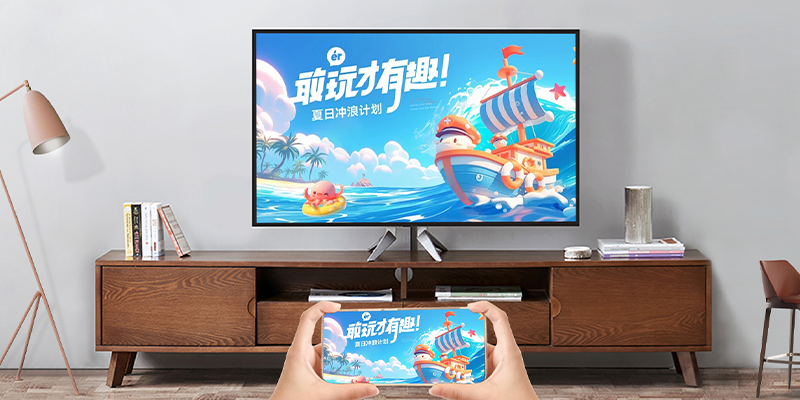
There are various methods for wireless screen mirroring from a mobile phone to a Sony TV, and the following are some common steps:

Method of wireless screen mirroring from mobile phone to Sony TV|BJCast

Using Sony TV’s built-in screen mirroring function

  1. Ensure the same network:
    Connect your phone and Sony TV to the same Wi Fi network.
  2. Turn on Sony TV screen mirroring function:
    Press the “Source” or “Enter” button on the Sony TV remote control, and then select the “Screen Mirroring” or “Projection” option (the specific name may vary depending on the TV model).
    At this point, the Sony TV will display ‘Waiting for external device connection’.
  3. Open the screen mirroring function on your phone:
    Find the “screen mirroring” or “screen mirroring” function in the phone’s settings or shortcut menu.
    Search and select the Sony TV model to connect.
  4. Connection successful:
    Sony TV will automatically display a pairing prompt, select ‘Allow’ to complete the connection.
    After successful connection, the content on the phone screen will be synchronized and displayed on the Sony TV.

Using third-party screen casting software

  1. Download and install software:
    Download and install the same third-party software that supports screen mirroring function, such as BJCast, on both your phone and Sony TV.
  2. Ensure the same network:
    It is also necessary to ensure that the phone and Sony TV are connected to the same Wi Fi network.
  3. Open the software and connect the device:
    Open the screen mirroring software on your phone, search for and connect your Sony TV device.
    Follow the software prompts to complete pairing and connection operations.
  4. Start screen casting:
    After successful connection, you can select the content to be projected in the software for playback.

Using DLNA or Miracast technology

  1. Turn on Sony TV’s DLNA or Miracast feature:
    Find ‘Apps’ on Sony TV and go to, then select’ My Apps’.
    Find “Wireless Display” or similar options in “My Apps” and open them.
    If Miracast technology is supported, it is necessary to enable Miracast or WiFi display function on the phone (the specific name may vary depending on the phone model).
  2. Open the screen mirroring function on your phone:
    Turn on the screen mirroring function on your phone and search for Sony TV devices.
    If using DLNA technology, you need to select “DLNA” as the screen mirroring method on your phone.
  3. Connection successful:
    After following the prompts to complete the connection operation, the content on the phone screen will be synchronized and displayed on the Sony TV.

    In summary, there are various methods for wireless screen mirroring from mobile phones to Sony TVs, and users can choose the most suitable method based on their own needs and device conditions.