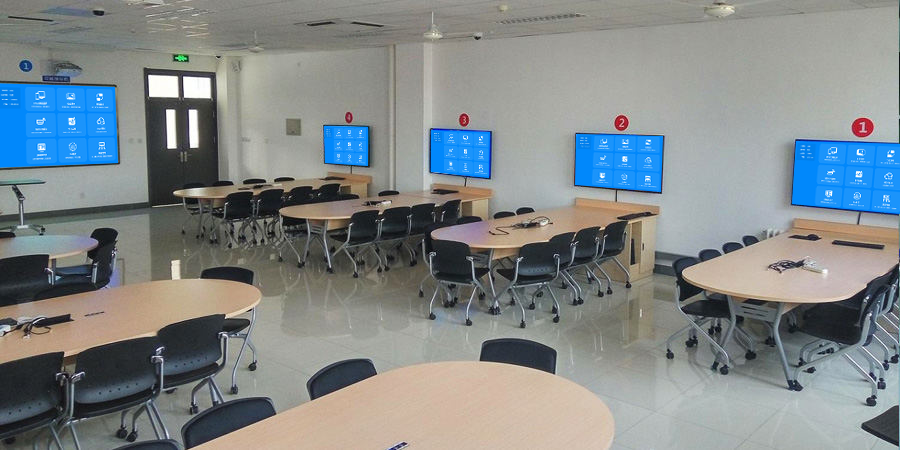
Wireless Presentation Gateway for Hotel: Complete Guide
Introduction
Wireless presentation gateway for hotel environments provides sophisticated solutions for business presentations, conference room connectivity, and guest entertainment. Hotels increasingly need robust wireless presentation systems that work seamlessly with various devices while maintaining ease of use for guests unfamiliar with complex technology. Understanding wireless presentation gateway options helps hoteliers select appropriate solutions for their properties.
Modern hotels face unique challenges regarding presentation technology. Business travelers expect to connect laptops, tablets, and smartphones to conference room displays without technical complications. Corporate event organizers require reliable wireless presentation capabilities that support multiple simultaneous presenters. Guest rooms benefit from wireless entertainment options that enable streaming from personal devices.
This comprehensive guide explores wireless presentation gateway solutions specifically designed for hotel environments, covering deployment considerations, feature requirements, and implementation best practices.
Understanding Hotel Wireless Presentation Needs
Hotels have distinct requirements that differentiate them from typical office environments.
Guest Expectations
Hotel guests expect:
- Seamless device connectivity without setup
- Support for various operating systems
- High-quality display of presentations
- Entertainment options in guest rooms
- Quick, intuitive operation
Business travelers particularly value the ability to walk into a conference room and present immediately without troubleshooting connectivity issues.
Event Requirements
Corporate events and conferences require:
- Support for multiple presenters simultaneously
- Ability to switch between presenters quickly
- Compatibility with diverse client devices
- Reliable performance for important presentations
- Professional appearance and functionality
These requirements demand more sophisticated solutions than simple wireless display adapters.
Maintenance Considerations
Hotel environments require:
- Easy management across many rooms
- Minimal technical support requirements
- Durable hardware for high usage
- Remote monitoring and troubleshooting
- Quick recovery from issues
These considerations influence gateway selection and deployment strategies.
Types of Wireless Presentation Gateways
Several categories of wireless presentation solutions work well in hotel environments.
Enterprise Wireless Presentation Systems
Enterprise-grade systems provide comprehensive features:
- Multi-user support with easy switching
- Centralized management capabilities
- Advanced security features
- Detailed analytics and reporting
- Integration with building systems
Examples include solutions from specialized manufacturers designed for high-traffic commercial environments.
Miracast and AirPlay Gateways
Protocol-specific gateways enable wireless display:
- Miracast receivers for Android and Windows devices
- AirPlay receivers for Apple devices
- Dual-protocol support for maximum compatibility
- Simple setup and operation
- Cost-effective solutions
These work well for smaller conference rooms and guest room entertainment.
Hybrid Solutions
Combining multiple technologies provides flexibility:
- Wireless connectivity options
- Wired backup connections
- Built-in content streaming
- Digital signage capabilities
- Room control integration
Hybrid solutions offer versatility for varied use cases.
Key Features for Hotel Wireless Presentation
When selecting wireless presentation gateways, certain features prove essential for hotel deployments.
Device Compatibility
Essential compatibility requirements:
- Windows laptop support (all versions)
- macOS computer support
- iOS device support (iPhone and iPad)
- Android device support
- Chrome OS compatibility
Supporting all major platforms ensures every guest can connect without issues.
Connection Methods
Multiple connection options increase accessibility:
- Wireless display protocols (Miracast, AirPlay, Chromecast)
- Browser-based web portals
- USB plug-and-play solutions
- QR code quick connect
- App-based connections
Providing multiple options accommodates different user preferences and technical comfort levels.
Quality and Performance
Performance requirements include:
- 4K resolution support for modern displays
- Smooth video playback
- Minimal latency for interactive use
- Stable connections in high-traffic environments
- Reliable performance across many uses daily
Quality directly impacts guest satisfaction and conference success.
Security Features
Security considerations for hotels:
- Network isolation capabilities
- Encrypted connections
- Guest network separation
- Session timeout settings
- Access control options
Protecting both guest devices and hotel networks requires appropriate security measures.
Management Capabilities
Centralized management is essential:
- Remote configuration and monitoring
- Firmware updates across devices
- Usage analytics and reporting
- Quick rollback capabilities
- Integration with property management systems
Efficient management reduces operational costs and technical support requirements.
Deploying Wireless Presentation in Conference Rooms
Conference room deployments require careful planning and execution.
Assessment and Planning
Before deployment:
1. Inventory all conference rooms and spaces
2. Identify display types and connections
3. Assess network infrastructure
4. Determine usage patterns and peak times
5. Calculate required capacity
This assessment informs equipment selection and placement decisions.
Equipment Selection
Choosing appropriate equipment:
- Match capabilities to room size and usage
- Consider future scalability
- Evaluate vendor support and warranty
- Assess ease of use for guests
- Calculate total cost of ownership
Selecting the right equipment ensures long-term satisfaction.
Network Considerations
Network requirements include:
- Adequate WiFi coverage in all spaces
- Bandwidth for multiple simultaneous users
- Quality of Service configurations
- Network segmentation for security
- Backup connectivity options
Strong network foundation enables reliable wireless presentation.
Installation Best Practices
Proper installation involves:
1. Professional mounting and positioning
2. Cable management for clean appearance
3. Thorough testing across all devices
4. Documentation of configurations
5. Staff training on troubleshooting
Quality installation prevents future problems.
Guest Room Wireless Entertainment
Wireless presentation extends to guest rooms for entertainment purposes.
In-Room Solutions
Guest room options include:
- Smart TV integration with wireless protocols
- Wireless display adapters for legacy TVs
- Streaming device compatibility
- Gaming console support
- Multi-device connectivity
These features enhance guest satisfaction and differentiate the property.
Content and Casting
Entertainment capabilities:
- Netflix, YouTube, and streaming app casting
- Photo and video sharing from devices
- Music streaming to room audio systems
- Personal content on room displays
- Guest device charging and connectivity
Supporting guest entertainment increases positive reviews and repeat visits.
Privacy and Security
Guest room security considerations:
- Clear separation from hotel networks
- No access to other guest devices
- Session termination after checkout
- Secure handling of guest data
- Clear privacy policies
Protecting guest privacy builds trust and prevents issues.
Integration with Hotel Systems
Wireless presentation systems often integrate with other hotel infrastructure.
Property Management Integration
Integration possibilities:
- Meeting room scheduling systems
- Digital signage networks
- Building automation systems
- Concierge and guest services
- Revenue management systems
Integration streamlines operations and enhances guest experiences.
Conference Services Integration
Event management connections:
- Event scheduling software
- Catering management systems
- Audio-visual equipment coordination
- Attendee communication tools
- Post-event reporting
Seamless integration improves conference service quality.
Guest Service Integration
Guest-facing connections:
- Mobile check-in and room selection
- In-room automation control
- Guest request systems
- Loyalty program integration
- Feedback collection
Integration creates cohesive guest experiences.
Managing Wireless Presentation Systems
Ongoing management ensures consistent performance.
Monitoring and Maintenance
Regular monitoring includes:
- Connection success rates
- Usage patterns and peak times
- Device health and uptime
- Network performance metrics
- Guest feedback analysis
Proactive monitoring identifies issues before they impact guests.
Support and Troubleshooting
Effective support requires:
- Clear documentation for guests
- Quick reference guides in rooms
- Dedicated support contact
- Remote diagnostic capabilities
- On-site technical support for events
Responsive support maintains guest satisfaction.
Updates and Upgrades
Keeping systems current involves:
- Regular firmware updates
- Security patch management
- Feature enhancements
- Compatibility improvements
- Hardware lifecycle planning
Timely updates prevent security vulnerabilities and maintain functionality.
Case Studies: Hotel Wireless Presentation
Real-world implementations demonstrate best practices.
Business Hotel Implementation
A downtown business hotel deployed wireless presentation in:
- 15 conference rooms of varying sizes
- 3 board rooms with advanced features
- Ballroom with modular configurations
- All guest rooms
Results included:
- 40% increase in conference room bookings
- Reduced AV equipment rental costs
- Improved guest satisfaction scores
- Positive reviews highlighting technology
Resort Property Implementation
A resort focused on guest entertainment:
- Poolside entertainment areas
- Conference center
- Guest rooms with smart TVs
- Kids activity center
Implementation led to:
- Enhanced family guest satisfaction
- Increased event bookings
- Differentiation from competitors
- Social media positive mentions
Convention Center Implementation
A large convention center required:
- Massive ballroom support
- Multiple concurrent breakout sessions
- Trade show floor capabilities
- Temporary installation options
The solution delivered:
- Successful large events
- Flexible configuration options
- High client satisfaction
- Referrals to other properties
Choosing a Wireless Presentation Vendor
Selecting the right vendor affects long-term success.
Evaluation Criteria
Important vendor factors:
- Industry experience and hotel references
- Product quality and reliability
- Support responsiveness and expertise
- Integration capabilities
- Total cost of ownership
Thorough evaluation prevents poor decisions.
Vendor Questions
Ask potential vendors:
1. How many hotel installations have you completed?
2. What support levels do you offer?
3. How do you handle firmware updates?
4. What integration options are available?
5. What is your typical deployment timeline?
Clear answers help assess vendor capabilities.
Contract Considerations
Important contract elements:
- Service level agreements
- Warranty terms
- Support response times
- Upgrade pathways
- Exit clause provisions
Well-structured contracts protect hotel interests.
Cost Considerations
Understanding costs helps with budgeting and ROI analysis.
Initial Investment
Startup costs include:
- Hardware and equipment
- Installation and configuration
- Network upgrades if needed
- Training and documentation
- Contingency reserves
Budget appropriately to avoid shortcuts that create long-term problems.
Ongoing Costs
Recurring expenses include:
- Maintenance and support contracts
- Software licensing
- Network bandwidth costs
- Technical support staffing
- Equipment replacement cycles
Factor ongoing costs into total ownership calculations.
Return on Investment
Potential ROI sources:
- Increased conference room bookings
- Reduced AV rental expenses
- Higher room rates achievable
- Improved guest satisfaction
- Operational efficiency gains
Calculate realistic ROI to justify investment.
Best Practices for Hotel Implementation
Follow proven approaches for success.
Planning Phase
- Involve all stakeholders early
- Assess current infrastructure thoroughly
- Plan for future growth
- Build in flexibility
- Document everything
Deployment Phase
- Use experienced installers
- Test extensively
- Train all staff
- Create documentation
- Plan for issues
Operations Phase
- Monitor proactively
- Gather guest feedback
- Update regularly
- Plan upgrades
- Maintain documentation
Following best practices leads to successful implementations.
Frequently Asked Questions
What is a wireless presentation gateway?
A wireless presentation gateway is a device that enables wireless screen mirroring and content sharing from personal devices to display screens without cables.
Why do hotels need wireless presentation systems?
Hotels need wireless presentation systems to meet guest expectations for easy connectivity, support business travelers, host conferences, and enhance entertainment options.
How much does hotel wireless presentation cost?
Costs vary widely based on features and scale, ranging from $200-500 per room for basic solutions to $5,000-20,000+ for enterprise conference systems.
Can guests use their own devices with hotel wireless presentation?
Yes, most systems support Windows, Mac, iOS, and Android devices, allowing guests to use their preferred technology.
How secure are hotel wireless presentation systems?
Enterprise-grade systems include network isolation, encryption, and access controls to protect both guest devices and hotel networks.
What is the lifespan of wireless presentation equipment?
With proper maintenance, wireless presentation equipment typically lasts 5-7 years before requiring replacement.
Conclusion
Wireless presentation gateway for hotel environments provides essential capabilities for modern properties. These systems enable business travelers to present effortlessly, conference organizers to host successful events, and guests to enjoy entertainment from their personal devices.
Selecting appropriate solutions requires careful consideration of guest needs, technical requirements, and operational capabilities. Enterprise-grade systems provide comprehensive features for high-traffic environments, while more modest solutions work well for smaller properties or specific use cases.
Successful deployment involves thorough planning, professional installation, and ongoing management. Hotels that implement wireless presentation effectively see improved guest satisfaction, increased revenue opportunities, and operational efficiencies.
For organizations seeking comprehensive wireless presentation solutions, dedicated enterprise systems offer features and support specifically designed for demanding hotel environments. These solutions provide the reliability, security, and management capabilities that modern hotels require.
Explore wireless presentation gateway options to transform your hotel’s connectivity and guest experience.
Discover Wireless Presentation Gateway for Hotel: Complete Guide at BJCast.
